Tuesday, November 15, 2022

Need an extra credit or two this spring? Here are a few options


Doing that degree-audit arithmetic and need one or two more credits?

If you're having trouble getting up to the number of credits you need and are looking for a 1-2-credit course to add, here are some options and tips. 

**Be sure to check course descriptions for special registration procedures or necessary permissions.

Know of something that's not on here? Email SeniorClassDean@barnard.edu, and we'll add it!

1-2 credit course options:

1. Fulfill your PE requirement if you haven't yet.
Register online and be sure to attend the first class meeting. PE courses may initially appear in your myBarnard program as 0 credits and will then be transformed to 1 credit (if you are eligible) after the final registration deadline.

Pro Tip:
Unfortunately, there is little to no space in PE for students who want this as an elective. Only students who have not yet completed the PE requirement will be able to preregister for PE. Dance, on the other hand (see below!), often has space


2. Take a dance class
Dance classes may initially appear in Student Planning as 0 credits -- if you don't change this when registering, you can fill out the Form to Request a Point of Dance Credit.

 
3. Depending on your background and interests, here are some popular ways to enrich your academic experience while also adding a credit or two. 


Pro tips:

  • Some of these may be full, but you may be able to join a waiting list.
  • Be sure to check course descriptions for prerequisites or special registration procedures!
a. For students who sing, play an instrument, or want to know more about music:

b. For  students with some computer programming experience:
Programming Languages -- COMS-W3101.
Development Technology -- COMS-W3102

Check Computer Science Course Listings for current options. Sometimes these classes are added later than others, so if you don't see them now, you might find them during the fall semester.


c. If you're interested in Physics/Astronomy, Biology, Environmental Science

Contact your department to see if you can earn credit for supervised research in a professor's lab

Or:

Seminar in Current Research Problems (Physics) - 2 credits

Seminar in Contemporary Physics and Astronomy - 1 credit

Topics in Biology: Crossroads in Bioethics - 2 credits

A Day in the Life of a New York Scientist (EnvSci) - 2 credits

d. Workshops in some Social Science and Humanities fields:

ECON-UN2029 Fed Challenge Workshop

URBS-UN3990 Crisis Management & Municipal Government

AFEN-BC2022 ReMaking Shakespeare's Sonnets: Race and Intertextu-ality - 2 credits, application needed

f. If you're interested in Theatre, Dance, or Backstage work:
Practicum or Rehearsal & Performance (Theatre or Dance) -- for actors, dancers, stage managers, prop or costume makers, and theatre tech people. Check the course description to see who to contact if you are interested.

g. If you have background in some languages and want to improve your fluency:

Check the course listings for 2-credit Intermediate or Advanced Conversation classes in FrenchItalian, or German,

Or supervised readings in languages -- varies each semester: past options have included Dutch, Sinhala, and Zulu.


h. If you're interested in International Affairs, Political Science, and/or Economics: consider a "short course" at the School of International and Public Affairs (SIPA)
*search the CU Directory of Classes for "course date" to see when the course starts & ends*
One of the "short courses" offered by the School for International & Public Affairs (SIPA). Search The SIPA Catalogue or the SIPA page of the CU Directory of Classes for 1-1.5-credit courses. You can't just register online for these.  Here is the procedure:

  1. Check to see if the class you want is on the list of SIPA courses approved for Barnard students (forthcoming -- link will be added when available; in the meantime, use your judgment to assess if the class is academic as opposed to professional development)
  2. Contact the instructor to ask if there is space available and if it is appropriate for you given your background. Get any approvals in writing (email is fine).
  3. Contact your academic adviser for approval that the course appropriately fits into both your schedule and a liberal arts curriculum. 
  4. Upload both approvals when submitting the online add form.


4. Search Vergil for courses between 0 and 2 credits.
You'll have to scroll through a lot of things that may not help you, like labs for courses you're not taking, courses limited to class years other than yours, but this will give you the most comprehensive listing.

Pro Tip:
Check the detailed course descriptions in the Directory of Classes for prerequisites, restrictions, or special application procedures.

Wednesday, November 9, 2022

Junior FAQ: I submitted a form online -- how do I know if it was received, reviewed, or approved?


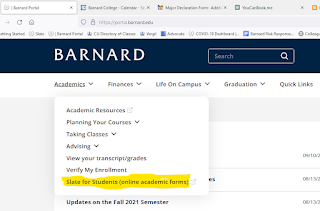
Did you submit one of the online forms that are available via the Slate for Students website? 

Wondering how to track its progress, i.e. to see if/when it was received, approved, processed, etc.?

Here's how to check.

1. Log into Slate directly or find it on the Barnard Portal under the Academics tab


 2. In the Home tab of Slate, scroll down to the bottom of the page, to Forms Submitted. There you'll see any forms you have submitted and can track them along their route from submitted to approved and processed. The legend below explains any symbols

3. That's it!

Tuesday, November 1, 2022

What is open & what is closed during Election Day Recess / Fall Break?


Monday Nov. 7
No classes
Administrative offices OPEN
Some Profs, Deans, and staff may be unavailable (check first if you're planning to go to office hours)

Tuesday, Nov. 8
No Classes
Administrative offices CLOSED
Polls OPEN

Tuesday, October 25, 2022

Registration Period Nov. 14-18: meet with adviser and register during your assigned time, beginning on TUESDAY 11/15/2022 for Juniors


As a reminder, you are encouraged to meet with your adviser sometime before your first assigned registration time (for juniors) Nov 15.  You will soon be able to plan courses, but you will not be able to register until your assigned day and time during the Nov 14-18 registration week.

Haven't met with your adviser yet?  Contact them to set up an appointment.

To register for spring courses starting Nov. 14:


  • Be sure you have met with your adviser, and that you know what to register for so you're on track to graduate!
  • Be sure you have planned (yellow) your preferred Spring courses in Student Planning so they'll be ready to go when your registration time begins.
  • Resolve any holds before registration week, so nothing gets in your way!
  • Log into Student Planning via myBarnard as soon as your first registration time begins on Monday 11/14, and no later than the end of your last registration time on Friday 11/18, and click the blue "REGISTER" button on the upper right.  
  • Unless a course has note informing you of special registration procedures (application, writing sample, audition, must attend first class to confirm, etc.), you will be registered for any course that shows up in green on your schedule.
  • Many courses will initially waitlist all students (e.g. Organic Chemistry I, Bio 1502). If you aren't able to add a class, add yourself to the waiting list and/or select a "plan B" option.
  • NOTEYou must be fully registered (green) for at least 12 credits by the end of this week, or you may be charged late fees There will be additional add/drop times in the coming weeks and months, along with the customary final "shopping" period at the beginning of the spring semester.
Questions?  Meet with your adviser or a dean.  

Friday, October 21, 2022

Fall 2022 Open House for Statistics Invite


Columbia's statistics department is hosting its Fall 2022 open-house on Wednesday, October 26th from 3:00pm-5:00pm in the Watson Hall Conference Room 601 (see directions for Watson Hall below). For students interested in learning more about the statistics major and concentration, please feel free to join the session and enjoy some free food & refreshments. 


Join the open house session to connect with fellow majors:
  • For current statistics majors and concentrators, please stop by so that you can give advice to prospective majors and also meet some new members from your program.
  • For prospective majors and concentrators, please stop by to meet some fellow rising majors!
Join the open house session to learn more about our programs:
  • Statistics major
  • Mathematics-Statistics joint major
  • Data Science joint major
  • Economics-Statistics joint major
  • Political Science-Statistics joint major
  • Statistics concentration
  • BA/MA option for statistics majors and joint majors
Time and location:
  • Wednesday (10/26/2022) 3:00pm-5:00pm
  • Watson Building (Room 601)
612 West 115th Street, 6th Floor
Columbia University
New York, NY 10025

Please RSVP to gjy2107@columbia.edu so that they have an idea of how much food to order and so they can add you to the Watson access list.  If you can't make this timeframe, please reach out to Gabriel J. Young directly so you can set-up a meeting.


Thursday, October 20, 2022

Wednesday, October 12, 2022

How do I withdraw from a class (now that the drop deadline has passed)?

The deadline to withdraw from a fall 2022 class is November 17. Withdrawn classes will not affect your GPA and you will not earn credit for them, but they will remain on your transcript, and a W will be entered place of the final grade. 

Note: You may not withdraw from a class if doing so would leave you with fewer than 12 credits.


To withdraw from a class, use this online form, following these steps:


1. Consult with your adviser.


2. Get an email from your adviser confirming they approve you to withdraw from this specific class.


3. Download that email as a PDF or save a screenshot of it.


4. Complete and submit the online W form, uploading your adviser’s confirmation email when prompted to do so.


5. You will receive an email confirmation once your W request is processed, ordinarily within two business days. 

Note that the W will not appear on your record until the end of the semester when final grades are entered.

Wednesday, September 28, 2022

"Uncover" for Summer 2022 Barnard P/D/F grades = available Sept 26 - Oct 26

If you elected the p/d/f option for a Barnard summer 2022 class, you may uncover that grade if you like.

The Uncover option for Barnard Summer 2022 classes will be available beginning Sept 26, until the October 26 deadline.

How?

Go to portal.barnard.edu --> Academics --> Taking Classes --> Change P/D/F Status

You will be able to uncover grades of P from Summer 2022 courses as of Monday, September 26

You will also be able to elect the p/d/f option for fall 2022 classes beginning Sept 26.


P/D/F available for Fall 2022 courses beginning Sept 26. Deadline is Nov. 17


If you are considering electing the p/d/f option for a fall 2022 course, you may do so beginning September 26, 2022.  The last day to elect the p/d/f option is November 17, 2022. (this is also the W deadline)

**Special note for mid-year grads -- you cannot uncover grades of P from a course taken during  your last semester. 

Also, reminder that previous years' special p/d/f rules are no longer in effect - courses taken p/d/f this year are subject to the usual rules.  Read all about p/d/f on the Registrar's website:

Rules:

Current students may elect P/D/F grading in a maximum of 23 points (22 points for students entering as transfers).  Courses that are only available with P/F grading are not counted. Courses where p/d/f grading is chosen but the grade is later uncovered will still count towards the credit limit.

The instructor is not informed when a student elects the Pass/D/Fail option. The instructor will assign a letter grade, which will be converted to P/D/F.  Because of this, students may see a letter grade in SSOL and should reference their Barnard transcript to see the P/D/F grade.

  • A letter grade of A+ through C- will appear on the transcript as a P, and will not count in the gpa

  • A letter grade of D will appear on the transcript as a D, and will count in the gpa

  • A letter grade of F will appear on the transcript as an F, and will count in the gpa

Classes taken for p/d/f grades can be applied to general education requirements but not to major or minor requirements.  

How to elect or revoke the p/d/f option

After the registration deadline for a term, students can elect p/d/f grading for any registered course.   The deadline to make this election (or to undo it - also called “revoking”) is posted in the academic calendar.  Students may not request P/D/F retroactively.

To elect the pd/f/ option:

-Go to portal.barnard.edu.  (Use a browser other than Safari).

- Under the Academics tab, click on "Planning your courses", and then "Request P/D/F for a course".

- Log in

-Click on Pass/D/Fail.  

-Click “P/D/F” in the Select column for each course you want to take p/d/f.  Be sure to submit a request for each part of a course (e.g. lecture and lab). 

-Click submit.


After 3 business days, you can return to the same portal page to check the status of your request.

-If your request is still pending, you will see your request but no action.

-If your request has been approved, you will see “Approved” in the PDF Status column 

-You will also see “Grading: Pass/Fail” on the course section in Student Planning.


If you requested P/D/F for a course in your major department

-you will see "Dept Chair approval reqd" in the PDF Status column.

-you will also receive email instructing you to obtain department chair approval by a certain deadline

-If the request is approved by the Chair, you will see a status of “Approved.”  If not, it will say “Denied.”


To undo/ revoke your p/d/f election (must be done prior to the p/d/f deadline):

-click on “Revoke” in the Select column.

-Within 3 business days, the “Grading: Pass/Fail” note will have returned to “Graded” in Student Planning.

-If you revoke the p/d/f election, it will not count towards your p/d/f credit limit.

-If you drop or officially withdraw from a class that you had previously p/d/f'd, you should also revoke the p/d/f so that it won't count towards your p/d/f limit.

Tuesday, September 27, 2022

The English Conference - Art and Artifact with Jennifer Egan (ENGL BC3098) available for Fall 2026!

The English Department is offering The English Conference this fall, featuring Jennifer Egan—an acclaimed American novelist and journalist! ...